

Without the Internet, agents are useless. With the Internet, they're dangerous.
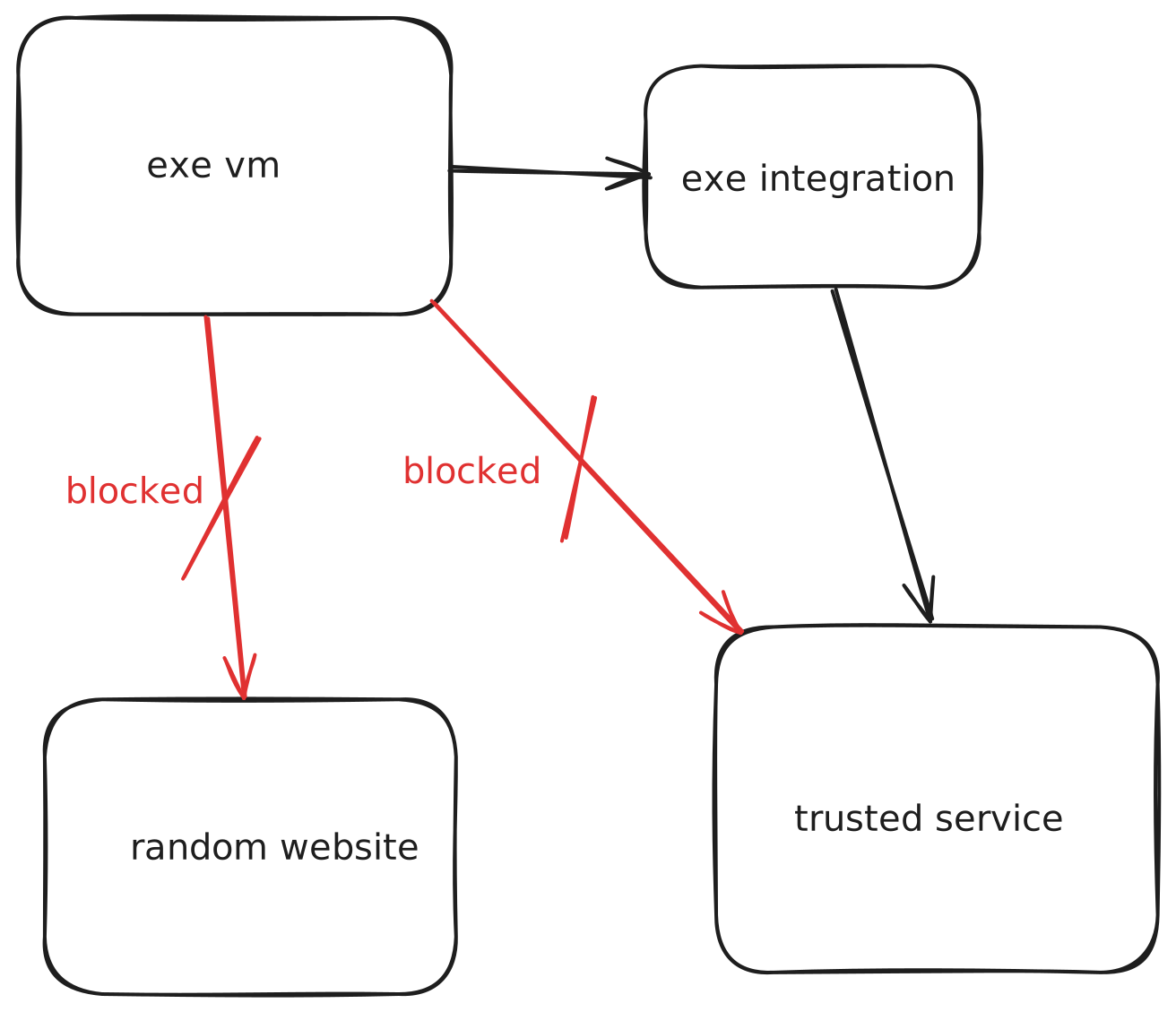
One approach is to allow Internet access, but through carefully controlled sippy straws. Let through only requests to destinations that you trust and deny all of the rest.
exe now makes this easy.
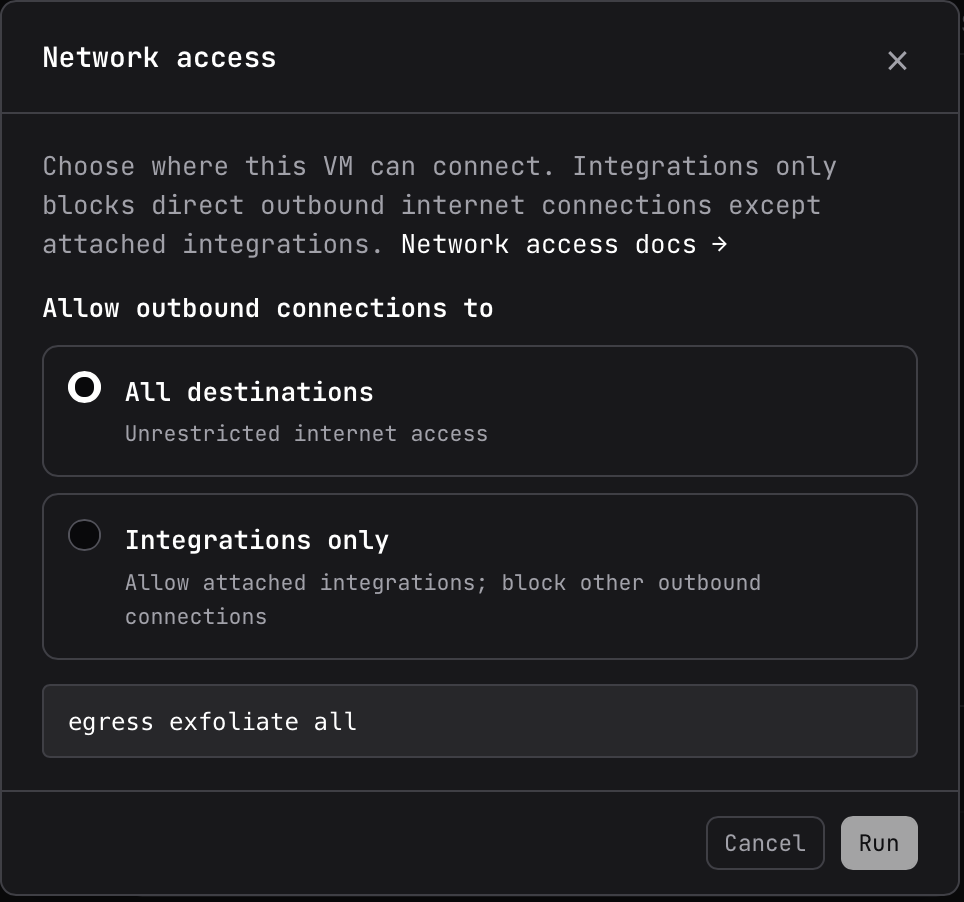
TL;DR: Run ssh exe.dev egress YOUR-VM integrations, or click the Network Access button on a VM's detail page. This will limit YOUR-VM's outbound internet access to any specific integrations you have attached to that VM.
Controlled Ingress, Controlled Egress
Exe manages both ingress and egress. Incoming connections are private by default; you choose who can access your VM.
Outgoing connections are open by default, with integrations providing credentials for connected services. Now you can restrict outbound traffic to just those integrations, giving agents access to the services they need while blocking the rest of the internet.
How It Works
Egress filtering happens at a network packet level. Anything higher level than that is subject to an end run by agents: they have memorized DNS and they can find proxies to convert traffic from one shape to another. We run our own DNS servers to prevent DNS request smuggling. And when you switch egress to integrations-only, we disable server-side web tools on requests sent through our LLM gateway.
People used to say things like "I'm sure it's not secure against a nation-state attacker." Frontier models are the new nation-states. But unlike nation-states, we can pen test ourselves using actual frontier models.
The agents found a bunch of escapes, all through clever use of server-side tools from Anthropic and OpenAI. There were a surprising number of them. Models are clever and persistent. And—when multiple are running on a single VM concurrently—happy to claim credit for the discoveries of others. (Here’s to you, Grok.)
As a result, we closed that entire pathway for requests using our LLM gateway. The rest of our system survived the trial by fire. We believe that we have closed all escape routes straightforwardly discoverable by current models. We will continue to probe in-house as new models are released and harden as needed.
Threat Model
Turning off general-purpose Internet access does make your VM more secure, but this is intended to protect against accidents, not an APT.
Also, it remains incumbent on you to think carefully about what an agent could do via the integrations you have attached. Are they usable as proxies for other purposes? Every read request from your agent is a write to someone else’s logs; are those writes acceptable? Put another way, your trust envelope now includes those external services.
The traditional startup advice is to offer painkillers, not vitamins. Consider this to be Xanax; running agents should not fill you with anxiety that one mistake on their part will have disastrous consequences.
Advanced Mode
Our integrations give you high level access controls: connect to this Postgres server, connect to GitHub, connect to this website. If you want more control, consider setting up a proxy VM for yourself. Then set up a peer integration that allows your controlled VM to talk to your proxy VM. The proxy VM can then run arbitrary software to inspect requests and filter, augment, or forward them.
There are no problems that cannot be solved with another layer of indirection except needing an infinite number of layers of indirection.
Sample Transcript
Create a new VM:
$ ssh exe.dev new --name=no-net
Creating no-net using image boldsoftware/exeuntu...

Coding agent
https://no-net.shelley.exe.xyz

App (HTTPS proxy → :8000)
https://no-net.exe.xyz

SSH
ssh no-net.exe.xyz
It has full internet access:
$ ssh no-net.exe.xyz curl -fsS https://exe.dev
Agent docs: https://exe.dev/llms.txt
Human docs: https://exe.dev/docs
Limit its internet access to integrations only:
$ ssh exe.dev egress no-net integrations
Set egress policy for "no-net" to integrations
Now the same request is rejected:
$ ssh no-net.exe.xyz curl -fsS https://exe.dev
curl: (6) Could not resolve host: exe.dev
Create an integration that provides access:
$ ssh exe.dev integrations add http-proxy --name inception --target https://exe.dev --no-auth
Added integration inception

To use this integration, attach it to a VM first:
  integrations attach inception vm:<vm-name>

Usage from a VM:
  curl https://inception.int.exe.xyz/
Attach it to our VM:
$ ssh exe.dev integrations attach inception vm:no-net
Attached inception to vm:no-net
Access works via the integration:
$ ssh no-net.exe.xyz curl -fsS https://inception.int.exe.xyz/
Agent docs: https://exe.dev/llms.txt
Human docs: https://exe.dev/docs